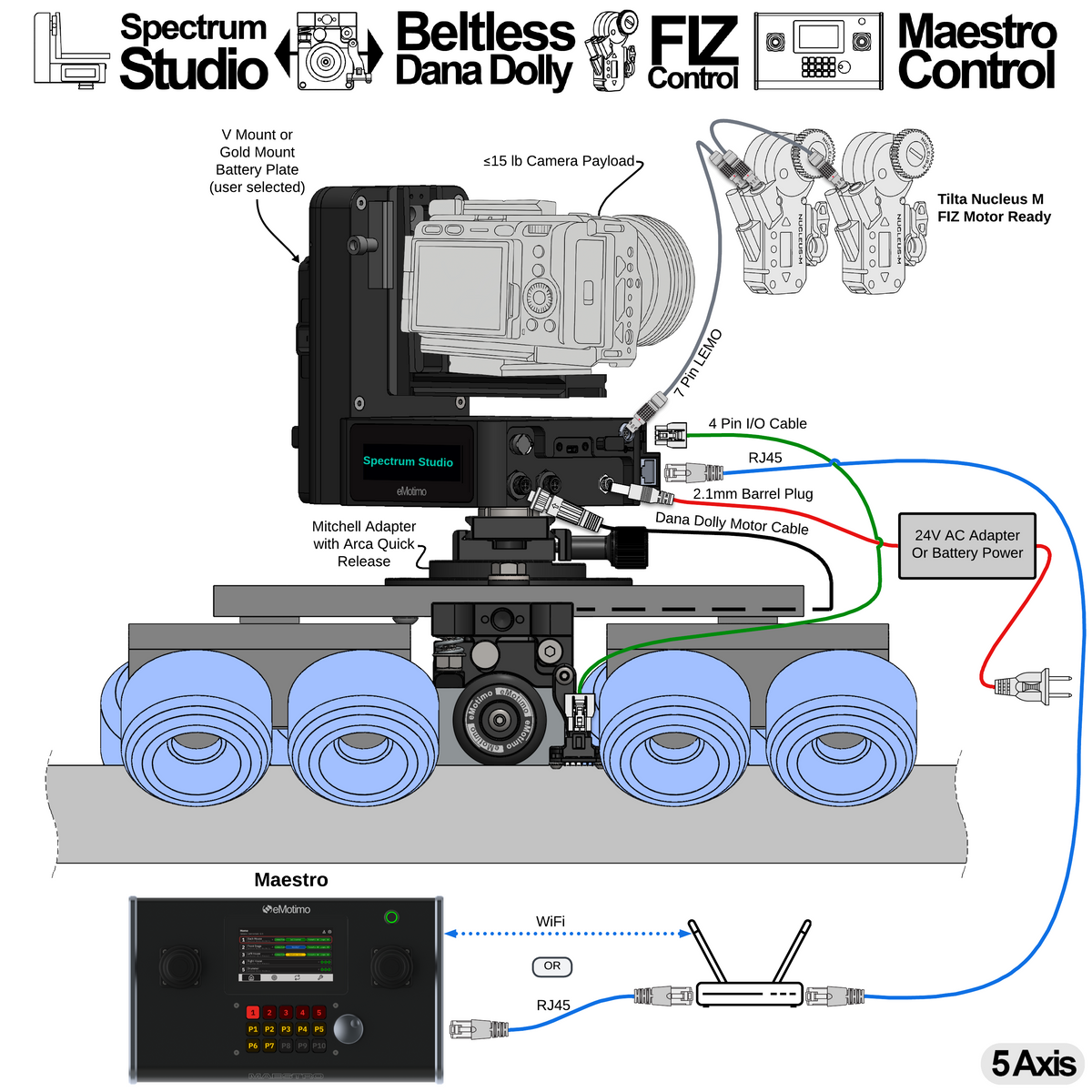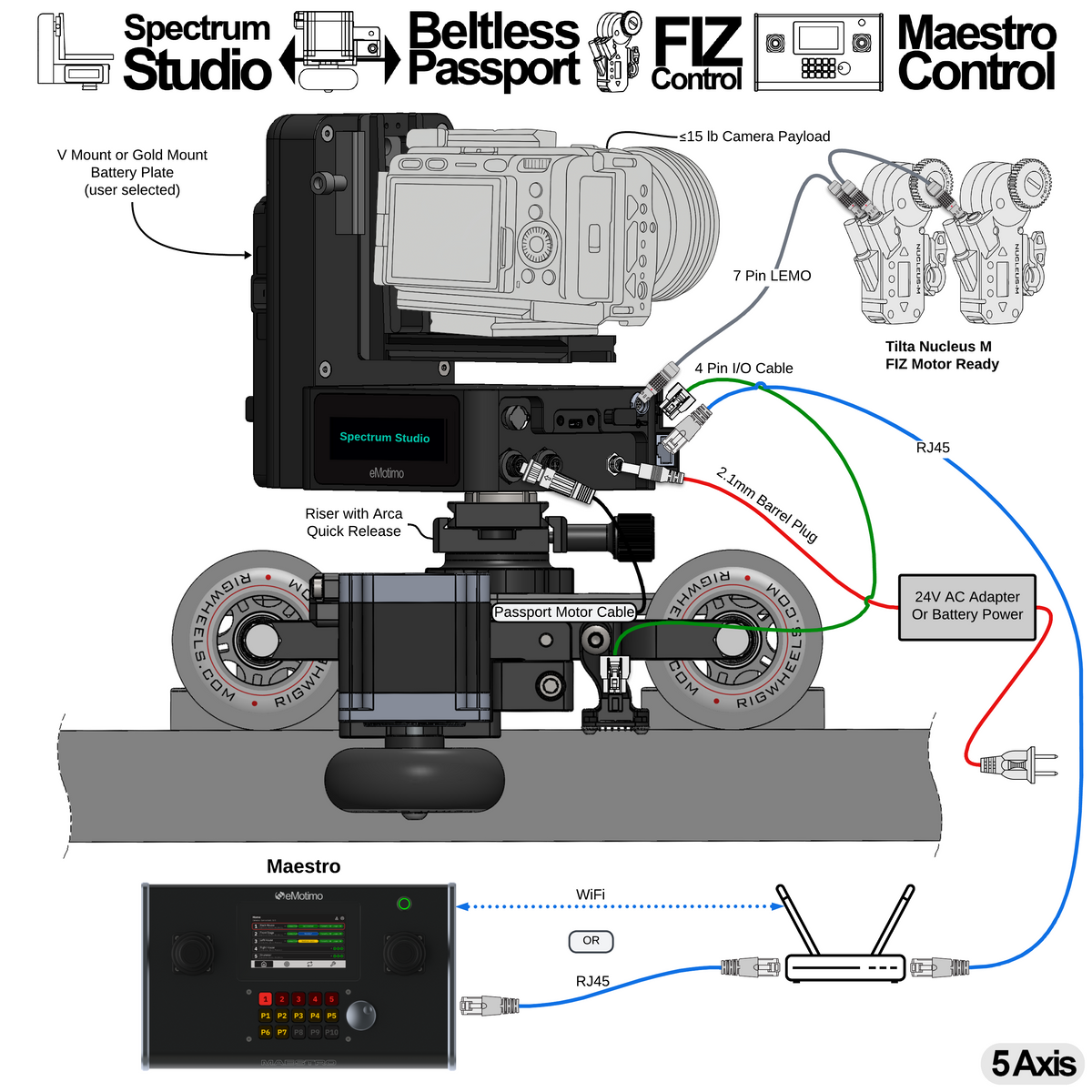
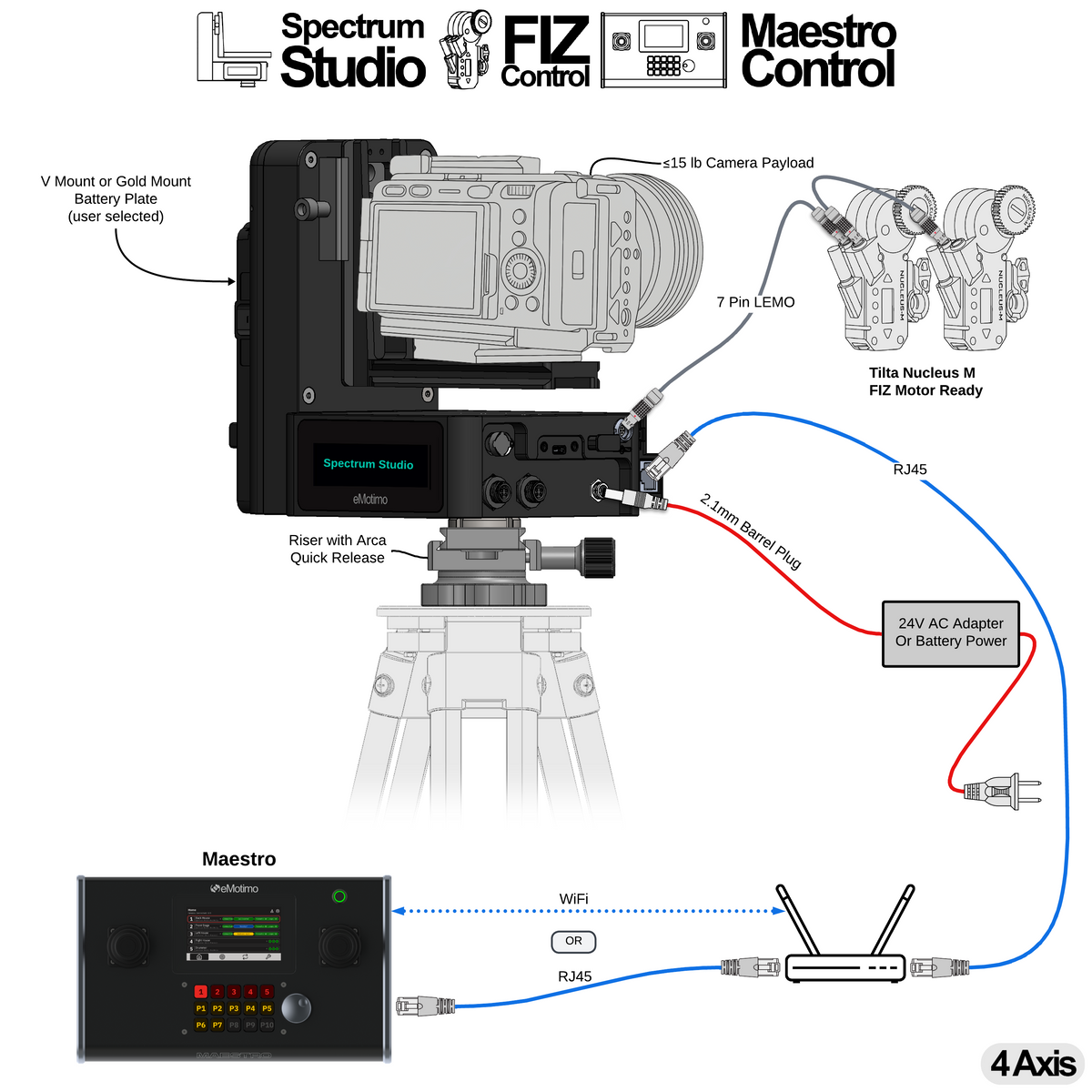
A21.0: Control Pan, Tilt, and FIZ with Maestro

Features:
- Coordinated pan, tilt, and FIZ motion
- Physical inputs for every eMotimo axis of control
- Tune live-control speed and feel for each axis, map axes to the preferred inputs, and reverse direction when needed
- Maestro automatically discovers eMotimo controllers on the same network
- Set and recall 30 timed, cinematic presets
- Set and run 8 timed, cinematic loops
- Power-on positioning gets the system ready within five minutes of startup. Saved presets and loops load automatically, so operators do not have to recreate their shots each time they power on.
- Switch between connected camera rigs from Maestro’s touchscreen or built-in Stream Deck keys
- Battery or AC operation for Spectrum Studio
- Camera payloads up to 15 lb
- Power and control for Tilta Nucleus-M and Nucleus-M II FIZ motors
What do you need from eMotimo?
What else do you need from a third party?
- Tripod
- Two Tilta Nucleus-M or Nucleus-M II motors and the required cables
- Optional: V-Mount or Gold Mount battery for mobile operation (Spectrum Studio includes an AC adapter)
- Ethernet cabling and a network connection for Maestro and Spectrum Studio
Steps to program:
- Power on Spectrum Studio and Maestro on the same network. Maestro discovers the controller automatically.
- Select the rig on Maestro. Use its physical inputs to frame the shot and adjust axis mapping, speed, and feel.
- Save the start and end positions as timed presets.
- Create a loop between those presets and set its move timing.
- Start and stop the loop from Maestro’s built-in Stream Deck keys.
At the next startup, power-on positioning restores the saved setup and gets the rig ready within five minutes.
A21.1: Control Pan, Tilt, and FIZ Over a Network with Bitfocus Companion

Features:
- pan, tilt, focus, and zoom move together in coordinated shots
-
Cinematic Studio Ready
- Live control
- Set and recall 30 timed, cinematic presets
- Set and recall 8 timed, cinematic loops (ping-pong)
- Control over a wired network with Bitfocus Companion or locally with the included gaming controller
- Battery or AC operation
- Supports camera payloads up to 15 lb
- Powers and controls Tilta Nucleus-M and Nucleus-M II FIZ motors
What do you need from eMotimo?
What else do you need from a third party?
- Tripod
- Two Tilta Nucleus-M or Nucleus-M II motors and the required cables
- Optional: V-Mount or Gold Mount battery for mobile operation (Spectrum Studio includes an AC adapter)
- Computer with Bitfocus Companion installed
- Elgato Stream Deck XL (recommended for Bitfocus Companion)
Steps to program:
- Power on Spectrum Studio and connect the computer running Bitfocus Companion to the same wired network.
- Configure the eMotimo connection and assign live-control, preset, and loop actions through the Stream Deck.
- Use Companion to frame two positions and set a preset at each one.
- Use Companion’s loop actions to select those presets as the endpoints and set the move timing.
- Start and stop the loop through the connected Stream Deck.
For network controller configuration, see the Bitfocus Companion setup guide.
A21.2: Control Pan, Tilt, and FIZ Over a Network with Skaarhoj

Features:
- pan, tilt, focus, and zoom move together in coordinated shots
-
Cinematic Studio Ready
- Live control
- Set and recall 30 timed, cinematic presets
- Set and recall 8 timed, cinematic loops (ping-pong)
- Control over a wired network with Skaarhoj or locally with the included gaming controller
- Battery or AC operation
- Supports camera payloads up to 15 lb
- Powers and controls Tilta Nucleus-M and Nucleus-M II FIZ motors
What do you need from eMotimo?
What else do you need from a third party?
- Tripod
- Two Tilta Nucleus-M or Nucleus-M II motors and the required cables
- Optional: V-Mount or Gold Mount battery for mobile operation (Spectrum Studio includes an AC adapter)
- Skaarhoj controller (PTZ Fly or PTZ Extreme recommended)
Steps to program:
- Power on Spectrum Studio and connect the Skaarhoj controller to the same wired network.
- Use the Skaarhoj controls to frame two positions and set a preset at each one.
- On the Skaarhoj looping page, select a loop and assign the two presets as points A and B.
- Set the loop timing, then start and stop the loop from Skaarhoj.
For network controller configuration, see the Skaarhoj setup guide.
A21.3: Control Pan, Tilt, and FIZ with a Gaming Controller

Features:
- pan, tilt, focus, and zoom move together in coordinated shots
-
Cinematic Studio Ready
- Live control
- Set and recall 30 timed, cinematic presets
- Set and recall 8 timed, cinematic loops (ping-pong)
- Control locally with the included gaming controller
- Battery or AC operation
- Supports camera payloads up to 15 lb
- Powers and controls Tilta Nucleus-M and Nucleus-M II FIZ motors
What do you need from eMotimo?
What else do you need from a third party?
- Tripod
- Two Tilta Nucleus-M or Nucleus-M II motors and the required cables
- Optional: V-Mount or Gold Mount battery for mobile operation (Spectrum Studio includes an AC adapter)
Steps to program:
- Power on Spectrum Studio and pair the included gaming controller.
- Use the gaming controller to frame the shot and open Programmed Shots.
- Set the start and end points using the gaming controller.
- Set Shot Style to Ping-Pong, adjust move speed if needed, then start the shot from the gaming controller.
A21.4: Control Pan and Tilt Over a Network with Bitfocus Companion

Features:
- pan, and tilt move together in coordinated shots
-
Cinematic Studio Ready
- Live control
- Set and recall 30 timed, cinematic presets
- Set and recall 8 timed, cinematic loops (ping-pong)
- Control over a wired network with Bitfocus Companion or locally with the included gaming controller
- Battery or AC operation
- Supports camera payloads up to 15 lb
What do you need from eMotimo?
What else do you need from a third party?
- Tripod
- Optional: V-Mount or Gold Mount battery for mobile operation (Spectrum Studio includes an AC adapter)
- Computer with Bitfocus Companion installed
- Elgato Stream Deck XL (recommended for Bitfocus Companion)
Steps to program:
- Power on Spectrum Studio and connect the computer running Bitfocus Companion to the same wired network.
- Configure the eMotimo connection and assign live-control, preset, and loop actions through the Stream Deck.
- Use Companion to frame two positions and set a preset at each one.
- Use Companion’s loop actions to select those presets as the endpoints and set the move timing.
- Start and stop the loop through the connected Stream Deck.
For network controller configuration, see the Bitfocus Companion setup guide.
A21.5: Control Pan and Tilt Over a Network with Skaarhoj

Features:
- pan, and tilt move together in coordinated shots
-
Cinematic Studio Ready
- Live control
- Set and recall 30 timed, cinematic presets
- Set and recall 8 timed, cinematic loops (ping-pong)
- Control over a wired network with Skaarhoj or locally with the included gaming controller
- Battery or AC operation
- Supports camera payloads up to 15 lb
What do you need from eMotimo?
What else do you need from a third party?
- Tripod
- Optional: V-Mount or Gold Mount battery for mobile operation (Spectrum Studio includes an AC adapter)
- Skaarhoj controller (PTZ Fly or PTZ Extreme recommended)
Steps to program:
- Power on Spectrum Studio and connect the Skaarhoj controller to the same wired network.
- Use the Skaarhoj controls to frame two positions and set a preset at each one.
- On the Skaarhoj looping page, select a loop and assign the two presets as points A and B.
- Set the loop timing, then start and stop the loop from Skaarhoj.
For network controller configuration, see the Skaarhoj setup guide.
A21.6: Control Pan and Tilt with a Gaming Controller

Features:
- pan, and tilt move together in coordinated shots
-
Cinematic Studio Ready
- Live control
- Set and recall 30 timed, cinematic presets
- Set and recall 8 timed, cinematic loops (ping-pong)
- Control locally with the included gaming controller
- Battery or AC operation
- Supports camera payloads up to 15 lb
What do you need from eMotimo?
What else do you need from a third party?
- Tripod
- Optional: V-Mount or Gold Mount battery for mobile operation (Spectrum Studio includes an AC adapter)
Steps to program:
- Power on Spectrum Studio and pair the included gaming controller.
- Use the gaming controller to frame the shot and open Programmed Shots.
- Set the start and end points using the gaming controller.
- Set Shot Style to Ping-Pong, adjust move speed if needed, then start the shot from the gaming controller.
A21.7: Control Pan and Tilt with Maestro

Features:
- Coordinated pan and tilt motion
- Physical inputs for every eMotimo axis of control
- Tune live-control speed and feel for each axis, map axes to the preferred inputs, and reverse direction when needed
- Maestro automatically discovers eMotimo controllers on the same network
- Set and recall 30 timed, cinematic presets
- Set and run 8 timed, cinematic loops
- Power-on positioning gets the system ready within five minutes of startup. Saved presets and loops load automatically, so operators do not have to recreate their shots each time they power on.
- Switch between connected camera rigs from Maestro’s touchscreen or built-in Stream Deck keys
- Battery or AC operation for Spectrum Studio
- Camera payloads up to 15 lb
What do you need from eMotimo?
What else do you need from a third party?
- Tripod
- Optional: V-Mount or Gold Mount battery for mobile operation (Spectrum Studio includes an AC adapter)
- Ethernet cabling and a network connection for Maestro and Spectrum Studio
Steps to program:
- Power on Spectrum Studio and Maestro on the same network. Maestro discovers the controller automatically.
- Select the rig on Maestro. Use its physical inputs to frame the shot and adjust axis mapping, speed, and feel.
- Save the start and end positions as timed presets.
- Create a loop between those presets and set its move timing.
- Start and stop the loop from Maestro’s built-in Stream Deck keys.
At the next startup, power-on positioning restores the saved setup and gets the rig ready within five minutes.