
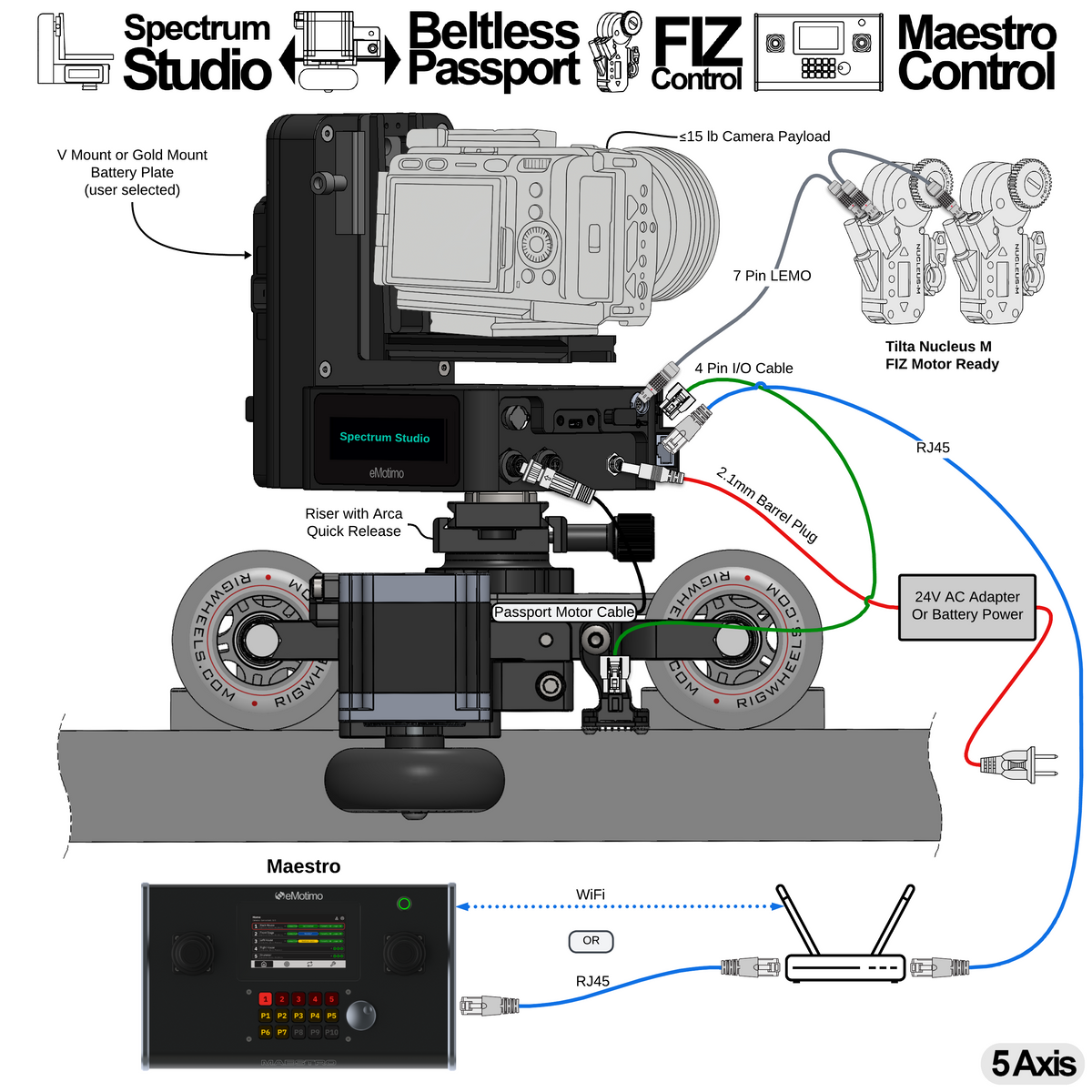
A20.0: Control Pan, Tilt, Slide, and FIZ Over a Network with Maestro

Features:
- Motorized beltless RigWheels Passport with track sensors
- Coordinated pan, tilt, slide, and FIZ motion
- Dedicated physical inputs for every axis of control, so operators can make live adjustments without navigating menus
- Tune the speed and feel of live control for each axis, map axes to the inputs you prefer, and reverse input direction when needed
- Maestro automatically discovers eMotimo controllers on the same network
- Set and recall 30 timed, cinematic presets
- Set and run 8 timed, cinematic loops
- Power-on positioning gets the system ready within five minutes of startup. Saved presets and loops load automatically, so operators do not have to recreate their shots each time they power on.
- Switch between connected camera rigs from Maestro’s touchscreen or built-in Stream Deck keys
- Battery or AC operation for Spectrum Studio
- Camera payloads up to 15 lb
- Power and control for Tilta Nucleus-M and Nucleus-M II FIZ motors
What do you need from eMotimo?
What else do you need from a third party?
- RigWheels Passport 2 with track
- Two Tilta Nucleus-M or Nucleus-M II motors and the required cables
- Optional: V-Mount or Gold Mount battery for battery operation (AC power adapter included with the bundle)
- Ethernet cabling and a network connection for Maestro and Spectrum Studio
Steps to program:
- Power up Spectrum Studio and Maestro on the same network. Maestro discovers the controller automatically.
- Select the rig on Maestro and use its dual three-axis joysticks to frame your shot. Adjust axis mapping, speed, and feel to suit the operator.
- Save the start and end positions as timed presets.
- Create a loop between those presets and set its move time and dwell.
- Start the loop from Maestro’s built-in Stream Deck keys.
At the next startup, power-on positioning restores the saved setup and gets the rig ready within five minutes.
A20.1: Control Pan, Tilt, Slide, and FIZ Over a Network with Bitfocus Companion

Features:
- Motorized beltless RigWheels Passport with track sensors
- Pan, tilt, slide, focus, and zoom move together in coordinated shots
-
Ready for cinematic studio production
- Live control
- Set and recall 30 timed, cinematic presets
- Set and run 8 timed, cinematic loops (ping-pong)
- Control over a wired network with Bitfocus Companion or locally with the included gaming controller
- Battery or AC operation for Spectrum Studio
- Supports camera payloads up to 15 lb
- Powers and controls Tilta Nucleus-M and Nucleus-M II FIZ motors
What do you need from eMotimo?
What else do you need from a third party?
- RigWheels Passport 2 with track
- Two Tilta Nucleus-M or Nucleus-M II motors and the required cables
- Optional: V-Mount or Gold Mount battery for battery operation (AC power adapter included with the bundle)
- Computer with Bitfocus Companion installed
- Elgato Stream Deck XL (recommended for Bitfocus Companion)
Steps to program:
- Power on Spectrum Studio and connect the computer running Bitfocus Companion to the same wired network.
- Configure the eMotimo connection and assign live-control, preset, and loop actions through the Stream Deck.
- Use Companion to frame two positions and set a preset at each one.
- Use Companion’s loop actions to select those presets as the endpoints and set the move timing.
- Start and stop the loop through the connected Stream Deck.
For network controller configuration, see the Bitfocus Companion setup guide.
A20.2: Control Pan, Tilt, Slide, and FIZ Over a Network with Skaarhoj

Features:
- Motorized beltless RigWheels Passport with track sensors
- Pan, tilt, slide, focus, and zoom move together in coordinated shots
-
Ready for cinematic studio production
- Live control
- Set and recall 30 timed, cinematic presets
- Set and run 8 timed, cinematic loops (ping-pong)
- Control over a wired network with Skaarhoj or locally with the included gaming controller
- Battery or AC operation for Spectrum Studio
- Supports camera payloads up to 15 lb
-
Powers and controls Tilta Nucleus-M and Nucleus-M II FIZ motors
What do you need from eMotimo?
What else do you need from a third party?
- RigWheels Passport 2 with track
- Two Tilta Nucleus-M or Nucleus-M II motors and the required cables
- Optional: V-Mount or Gold Mount battery for battery operation (AC power adapter included with the bundle)
- Skaarhoj controller (PTZ Fly or PTZ Extreme recommended)
Steps to program:
- Power on Spectrum Studio and connect the Skaarhoj controller to the same wired network.
- Use the Skaarhoj controls to frame two positions and set a preset at each one.
- On the Skaarhoj looping page, select a loop and assign the two presets as points A and B.
- Set the loop timing, then start and stop the loop from Skaarhoj.
For network controller configuration, see the Skaarhoj controller setup guide.
A20.3: Control Pan, Tilt, Slide, and FIZ with a Gaming Controller

Features:
- Motorized beltless RigWheels Passport with track sensors
- Pan, tilt, slide, focus, and zoom move together in coordinated shots
-
Ready for cinematic studio production
- Live control
- Set and recall 30 timed, cinematic presets
- Set and run 8 timed, cinematic loops (ping-pong)
- Control locally with the included gaming controller
- Battery or AC operation for Spectrum Studio
- Supports camera payloads up to 15 lb
-
Powers and controls Tilta Nucleus-M and Nucleus-M II FIZ motors
What do you need from eMotimo?
What else do you need from a third party?
- RigWheels Passport 2 with track
- Two Tilta Nucleus-M or Nucleus-M II motors and the required cables
- Optional: V-Mount or Gold Mount battery for battery operation (AC power adapter included with the bundle)
Steps to program:
- Power on Spectrum Studio and use the included gaming controller to position the camera.
- Open Programmed Shots and set the start and end points with the gaming controller.
- Select Ping-Pong to repeat the move between those points.
- Set the move speed, if needed, and start the shot from the gaming controller.
A20.4: Control Pan, Tilt, and Slide Over a Network with Bitfocus Companion

Features:
- Motorized beltless RigWheels Passport with track sensors
- Pan, tilt, and slide move together in coordinated shots
-
Ready for cinematic studio production
- Live control
- Set and recall 30 timed, cinematic presets
- Set and run 8 timed, cinematic loops (ping-pong)
- Control over a wired network with Bitfocus Companion or locally with the included gaming controller
- Battery or AC operation for Spectrum Studio
- Supports camera payloads up to 15 lb
What do you need from eMotimo?
What else do you need from a third party?
-
RigWheels Passport 2 with track
- Optional: V-Mount or Gold Mount battery for battery operation (AC power adapter included with the bundle)
- Computer with Bitfocus Companion installed
- Elgato Stream Deck XL (recommended for Bitfocus Companion)
Steps to program:
- Power on Spectrum Studio and connect the computer running Bitfocus Companion to the same wired network.
- Configure the eMotimo connection and assign live-control, preset, and loop actions through the Stream Deck.
- Use Companion to frame two positions and set a preset at each one.
- Use Companion’s loop actions to select those presets as the endpoints and set the move timing.
- Start and stop the loop through the connected Stream Deck.
For network controller configuration, see the Bitfocus Companion setup guide.
A20.5: Control Pan, Tilt, and Slide Over a Network with Skaarhoj

Features:
- Motorized beltless RigWheels Passport with track sensors
- Pan, tilt, and slide move together in coordinated shots
-
Ready for cinematic studio production
- Live control
- Set and recall 30 timed, cinematic presets
- Set and run 8 timed, cinematic loops (ping-pong)
- Control over a wired network with Skaarhoj or locally with the included gaming controller
- Battery or AC operation for Spectrum Studio
- Supports camera payloads up to 15 lb
What do you need from eMotimo?
What else do you need from a third party?
-
RigWheels Passport 2 with track
- Optional: V-Mount or Gold Mount battery for battery operation (AC power adapter included with the bundle)
- Skaarhoj controller (PTZ Fly or PTZ Extreme recommended)
Steps to program:
- Power on Spectrum Studio and connect the Skaarhoj controller to the same wired network.
- Use the Skaarhoj controls to frame two positions and set a preset at each one.
- On the Skaarhoj looping page, select a loop and assign the two presets as points A and B.
- Set the loop timing, then start and stop the loop from Skaarhoj.
For network controller configuration, see the Skaarhoj controller setup guide.
A20.6: Control Pan, Tilt, and Slide with a Gaming Controller

Features:
- Motorized beltless RigWheels Passport with track sensors
- Pan, tilt, and slide move together in coordinated shots
-
Ready for cinematic studio production
- Live control
- Set and recall 30 timed, cinematic presets
- Set and run 8 timed, cinematic loops (ping-pong)
- Control locally with the included gaming controller
- Battery or AC operation for Spectrum Studio
- Supports camera payloads up to 15 lb
What do you need from eMotimo?
What else do you need from a third party?
-
RigWheels Passport 2 with track
- Optional: V-Mount or Gold Mount battery for battery operation (AC power adapter included with the bundle)
Steps to program:
- Power on Spectrum Studio and use the included gaming controller to position the camera.
- Open Programmed Shots and set the start and end points with the gaming controller.
- Select Ping-Pong to repeat the move between those points.
- Set the move speed, if needed, and start the shot from the gaming controller.
A20.7: Control Pan, Tilt, and Slide Over a Network with Maestro

Features:
- Motorized beltless RigWheels Passport with track sensors
- Coordinated pan, tilt, and slide motion
- Dedicated physical inputs for every axis of control, so operators can make live adjustments without navigating menus
- Tune the speed and feel of live control for each axis, map axes to the inputs you prefer, and reverse input direction when needed
- Maestro automatically discovers eMotimo controllers on the same network
- Set and recall 30 timed, cinematic presets
- Set and run 8 timed, cinematic loops
- Power-on positioning gets the system ready within five minutes of startup. Saved presets and loops load automatically, so operators do not have to recreate their shots each time they power on.
- Switch between connected camera rigs from Maestro’s touchscreen or built-in Stream Deck keys
- Battery or AC operation for Spectrum Studio
- Camera payloads up to 15 lb
What do you need from eMotimo?
What else do you need from a third party?
- RigWheels Passport 2 with track
- Optional: V-Mount or Gold Mount battery for battery operation (AC power adapter included with the bundle)
- Ethernet cabling and a network connection for Maestro and Spectrum Studio
Steps to program:
- Power up Spectrum Studio and Maestro on the same network. Maestro discovers the controller automatically.
- Select the rig on Maestro and use its dual three-axis joysticks to frame your shot. Adjust axis mapping, speed, and feel to suit the operator.
- Save the start and end positions as timed presets.
- Create a loop between those presets and set its move time and dwell.
- Start the loop from Maestro’s built-in Stream Deck keys.
At the next startup, power-on positioning restores the saved setup and gets the rig ready within five minutes.
Share:
A18 = Spectrum ST4.3 + RigWheels Passport + Rotator
A19 = Spectrum Studio + Beltless Dana Dolly